
ChatGPT Can Now Work With the Actual Files on Your Computer
What happened when I gave the desktop work environment access to one folder—and why this changes how small businesses can use AI
PRACTICAL AI FOR BUSINESS • AI-USE-041
By Sam Urick, DSTech Solutions | August 4, 2026
This morning, ChatGPT did not simply tell me how to organize a disordered collection of business files. With my permission and direction, it worked inside the folder, created a new structure, moved the files, preserved the originals, and built the beginnings of a system we can keep using.
For years, most of us have experienced ChatGPT as a conversation. We type a question into a box, it produces an answer, and then we copy that answer somewhere else. The AI may help us think, draft, summarize, or plan, but a human still has to carry the result into the real working environment.
That boundary is beginning to move. In the ChatGPT desktop environment, the Codex work experience can be connected to a folder you choose. Within the permissions you provide, it can read files, understand how they relate to one another, create new documents, and modify the files in that working folder. The important change is not that the answers are better. The important change is that the AI can help perform the work.
What we actually accomplished
DSTech had accumulated a large collection of social-media graphics, Word documents, videos, campaign ideas, drafts, duplicates, and older versions. The material was valuable, but it had grown difficult to navigate. Before we could restart a consistent publishing schedule, we needed to understand what we already had.
I could have asked ChatGPT to recommend a folder structure and then spent hours creating folders, moving files, and documenting the result myself. Instead, we worked on the actual collection together.
- It inventoried the existing material and identified the major content categories.
- It preserved the previous collection in a dated archive rather than deleting it.
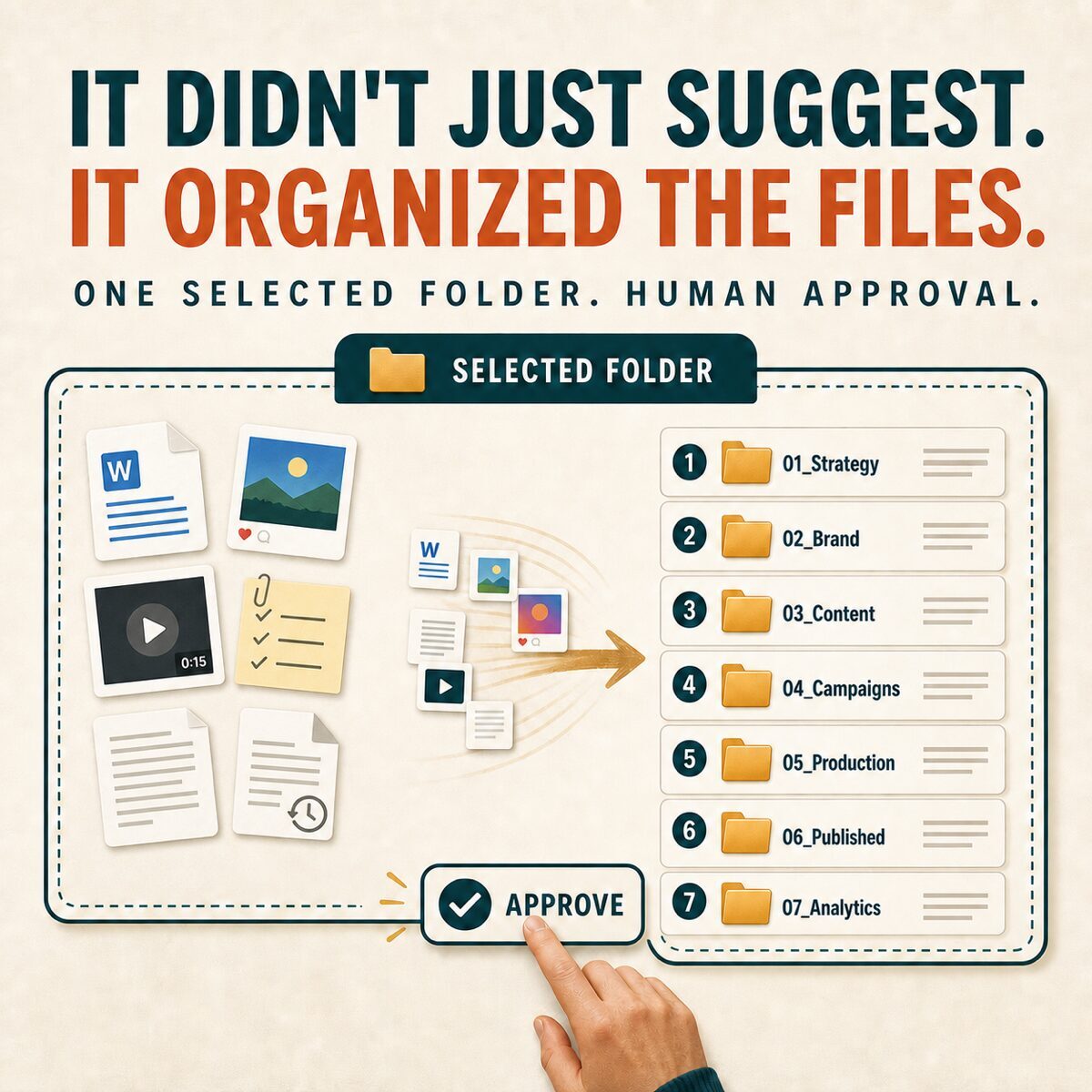
- It created a numbered folder structure for strategy, brand assets, content, campaigns, production, published work, and analytics.
- It separated AI, security, business continuity, company culture, offers, and video materials into logical areas.
- It created operating documents that explain where material belongs and what decisions are still needed.
- It began an index that can track each topic from source material through publication and results.
I remained responsible for the goal and the decisions. I reviewed the proposed organization, clarified what should be preserved, and checked the finished result. But I did not have to perform every mechanical step by hand.
This was not a demonstration created for a presentation. It was ordinary operational work that needed to be done—and it left us with a cleaner, more usable business asset.
Why this is different from uploading a document
Uploading one document to a chat is useful when you want a summary, a rewrite, or an answer about that document. A local working folder creates a broader context. The AI can examine multiple related files, compare them, follow an agreed structure, and write the approved changes back into that folder.
That makes the interaction feel less like asking a chatbot for advice and more like collaborating with an assistant inside a defined workspace. It can keep track of the objective, inspect the available material, carry out a series of steps, report its progress, and pause when it needs a decision or permission.
There is still an important boundary: it works with the files and access you provide. It does not mean ChatGPT should be given unrestricted access to an entire computer, and it does not eliminate the need for backups, permissions, or human review.
Where small businesses could use this
Most small businesses have valuable information trapped in poorly organized folders. The problem is rarely a complete lack of information. It is that the information is scattered, inconsistently named, duplicated, outdated, or difficult to find.
A folder-aware AI assistant could help with projects such as:
- Marketing libraries. Organize articles, social posts, photographs, brand materials, and campaign drafts into a reusable content system.
- Policy and procedure collections. Identify related documents, inconsistent names, missing dates, and material that needs human review.
- Meeting archives. Sort notes by customer, project, or date and create indexes or summaries that point back to the source files.
- Sales materials. Group proposals, service descriptions, case studies, and presentations while preserving prior versions.
- Operational documents. Standardize filenames, create starter templates, and assemble checklists from approved source material.
- Research collections. Separate source documents from drafts, summarize themes, and create a traceable reading list.
The best first projects are usually tedious, bounded, and easy to verify. A messy marketing folder is a better experiment than a mission-critical production system. The goal is to learn how the collaboration works while the consequences of a mistake remain small.
The safety rules matter more when AI can take action
When AI only produces text, a bad answer is usually easy to ignore. When AI can rename, move, create, or edit files, the quality of the instructions and the review process becomes more important.
My recommended starting rules are straightforward:
- Start with a copy. Back up the folder or work from a duplicate until you trust the process.
- Limit the scope. Choose one clearly defined folder instead of exposing more information than the task requires.
- State what must not change. Identify files that must be preserved, naming conventions that matter, and actions that require approval.
- Ask for a plan first. Review the proposed structure before allowing large batches of changes.
- Verify the result. Check the folder counts, open representative files, and confirm that the archive and index are usable.
- Protect sensitive information. Do not experiment with patient information, financial records, credentials, regulated data, or confidential customer material unless your organization has explicitly approved the environment, access controls, and process.
Capabilities can also vary by account, platform, region, rollout, and workplace policy. Business owners should confirm what is available in their environment and decide who is authorized to connect AI tools to business files.
A safe first experiment
If you want to understand this change, do not begin with a theoretical discussion. Choose a small project whose result you can see and inspect.
- Choose a low-risk folder. Use old marketing drafts, public reference material, or another collection that contains no sensitive information.
- Make a backup. Keep an untouched copy outside the working folder.
- Describe the outcome. Explain how you want the material organized, what should be preserved, and how success will be judged.
- Review the proposed plan. Ask the AI to inventory the folder and recommend the structure before it moves anything.
- Approve a small batch and inspect it. Verify the result, refine the rules, and expand only after the process behaves as expected.
From answering questions to helping perform the work
The first wave of generative AI taught people to ask better questions. The next wave is teaching us how to define work: choose the right scope, provide the right context, set boundaries, review a plan, and verify a finished result.
That may sound like a subtle change, but it is not. For a small business, the greatest value may not come from producing another paragraph faster. It may come from finally organizing years of accumulated knowledge, turning scattered material into an operating system, and freeing a business owner from hours of necessary but repetitive work.
This morning, I saw that transition firsthand. ChatGPT did not replace judgment, responsibility, or experience. It made those things more useful by helping carry the decisions into the actual files.
The question for a business owner is no longer only, “What can ChatGPT tell me?” It is becoming, “What carefully defined piece of work could we complete together?”
Sources and product notes
OpenAI product information was reviewed on August 4, 2026. OpenAI notes that desktop features and availability can depend on plan, platform, region, rollout, and workspace settings.
OpenAI: Projects and local folders